Occlusion
Understanding Occlusion in Augmented Reality
Occlusion ensures virtual content appears correctly behind real-world objects. Without occlusion, AR objects may appear to float in front of surfaces they should be hidden behind, breaking immersion.
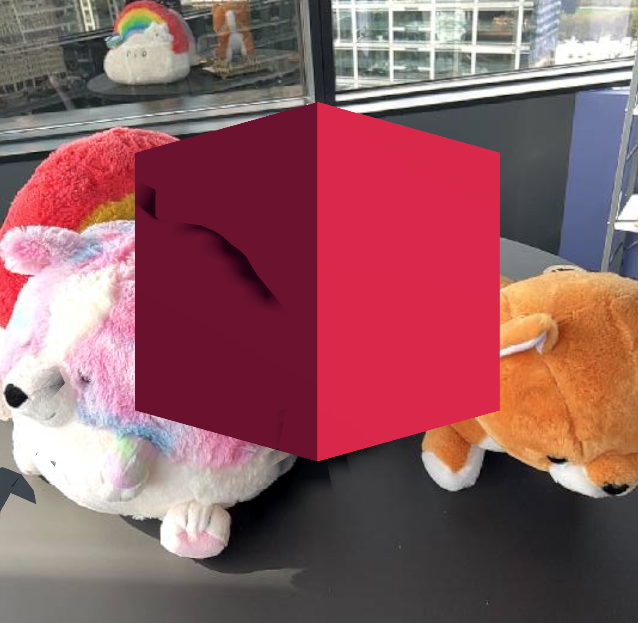
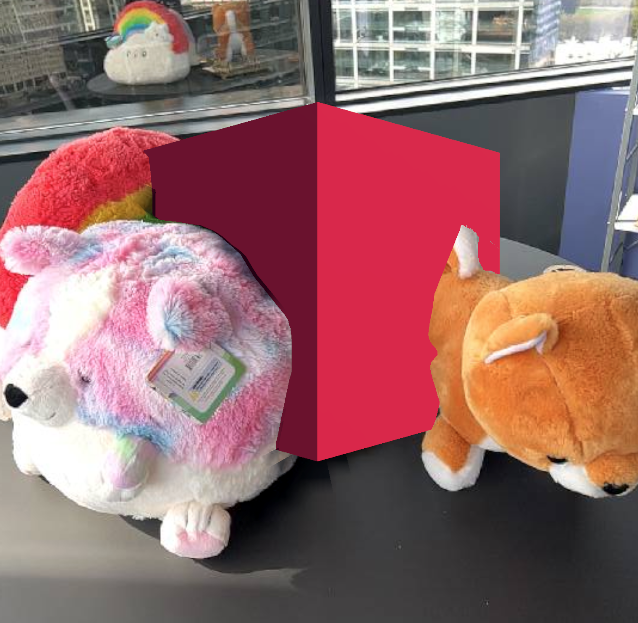
Left: AR without occlusion. Right: AR with real-world occlusion from NSDK.
Occlusion in NSDK
Occlusion is powered by depth sensing, and applications can choose which type of occlusion to use. Niantic Spatial SDK (NSDK) provides a depth-based occlusion system designed for cross-platform support, extended range, and playback workflows, with support for switching between dynamic and mesh-based occlusion depending on the needs of your application.
NSDK occlusion is available in Unity, Swift, and Kotlin. In Unity, occlusion is provided through built-in components. In Swift and Kotlin, NSDK supplies depth data, and applications implement occlusion within their rendering pipeline.
NSDK occlusion works on devices with and without LiDAR, and provides consistent behavior across supported platforms.
An example of occlusion as characters walk behind a tree
When to use NSDK occlusion
ARFoundation provides built-in occlusion on LiDAR-enabled Apple devices during live AR sessions. NSDK occlusion extends that capability to more devices, longer distances, and playback workflows.
Use NSDK occlusion when:
- You need occlusion on devices without LiDAR. NSDK generates depth from RGB camera input and supports a wider range of hardware. On non-LiDAR devices, depth quality is lower than hardware LiDAR and may appear noisier. On LiDAR devices, hardware depth typically provides higher close-range precision.
- You want consistent occlusion behavior across supported platforms.
- Your experience spans large or outdoor spaces. LiDAR depth often becomes unreliable beyond roughly 8 meters. NSDK depth can continue to provide usable occlusion results at greater distances, typically up to approximately 12–15 meters.
- You rely on NSDK Playback workflows for testing or debugging. In Unity, ARFoundation occlusion works only in live AR sessions. NSDK occlusion works in both live AR sessions and playback.
If your application targets only LiDAR-enabled Apple devices and runs exclusively in live AR sessions, ARFoundation’s built-in occlusion may be sufficient.
Types of Occlusion in NSDK
NSDK provides multiple occlusion techniques to balance speed, stability, and visual quality:
Instant Dynamic Occlusion (Fast, Noisy)
Dynamic occlusion directly refers to a depth buffer to perform occlusion. Depth data comes from either LiDAR frames or NSDK-generated depth using RGB camera input. Since depth data is generated quickly, this type of occlusion is good at capturing fast-moving objects, like people or pets. Just-in-time occlusion may not always align with meshing and can over- or under-occlude meshed objects.
Mesh Occlusion (Stable, Slow Occlusion)
Mesh-based occlusion uses a 3D mesh built from many depth frames and device poses by NSDK to determine occlusion surfaces. This technique averages a range of depth measurements, making it more accurate for static regions of the environment. This approach is more stable than instant dynamic occlusion and produces cleaner results, but updates are less frequent. Dynamic agents, including people and pets, may occlude less reliably.
Instant Depth + Mesh-Blended Occlusion (Unity SDK only)
Occlusion Stabilization has the advantages of both modes. It combines the fast response time of instant occlusion with the stable averaging effect of meshing. A depth map is produced from the NSDK mesh, rendered to a texture and combined with the latest depth buffer in a way that avoids flickering and Z-fighting. Use this mode when visual stability is critical. In performance-constrained scenes or simple AR experiences, the simpler occlusion modes may be more appropriate.
Choosing an occlusion mode
Each occlusion mode balances speed, stability, and visual quality differently. Use the following table to select the right mode for your experience:
| Mode | Strengths | Tradeoffs | Best for |
|---|---|---|---|
| Instant Dynamic Occlusion | Fast updates, captures moving objects | Noisy depth, less stable alignment | People, pets, dynamic scenes |
| Mesh Occlusion | Stable, clean results | Slower updates, weak for moving objects | Static environments and persistent surfaces |
| Instant Depth + Mesh-Blended | Stable and responsive | Higher GPU cost, more complex setup | Large scenes and high-visual-quality AR |
More Information
NSDK provides depth data for occlusion across supported platforms. Integration details vary by SDK and rendering pipeline.
For implementation details in Unity, including configuration of dynamic, mesh-based, and stabilized occlusion modes, see How to Setup Real-World Occlusion.